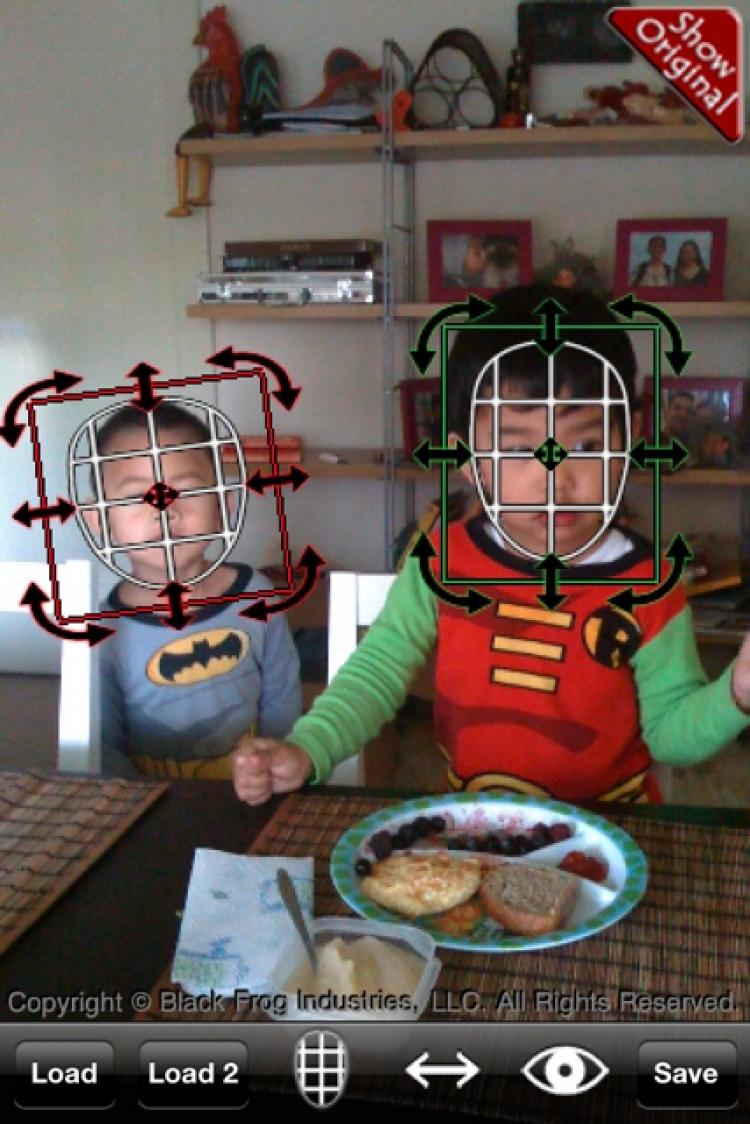
The culmination of the synergy between modern processors, modern programming techniques, and the latest innovations in user interface design is an app called iSwap Faces which, at long last, allows you to perform the ever-so-important task of digitally exchanging the faces of two individuals in a photograph.

When you have a photo opened, you will see two circular shapes that represent the two faces to be swapped. You simply move each circle over the faces in your photo and resize and rotate them as necessary. Clicking on the View icon, you will see the result of the swap immediately so that you can see if you need to make adjustments. To help blend a transplanted face to its new head, there are sliders to adjust contrast and hue so that you can get a perfect skin match.
It does take some practice and fine adjustments to get everything aligned and sized perfectly, but you can get a decent rendition even with rough adjustments. Once you finish you can share your masterpiece directly with the world through Twitter or Facebook. And if your surgery doesn’t result in a masterpiece, you can simply save the final image to the Photo Library for your own amusement.
iSwap Faces is good, clean fun for $1.99.
 Friends Read Free
Copy
Facebook
Tweet
Friends Read Free
Copy
Facebook
Tweet